Slot not being added where expected

Dynamic Cut and Stack (top down per column) DEBUG.kfpx (25.1 KB)

Hi,

I’m running pdfToolbox version 16.1.662.

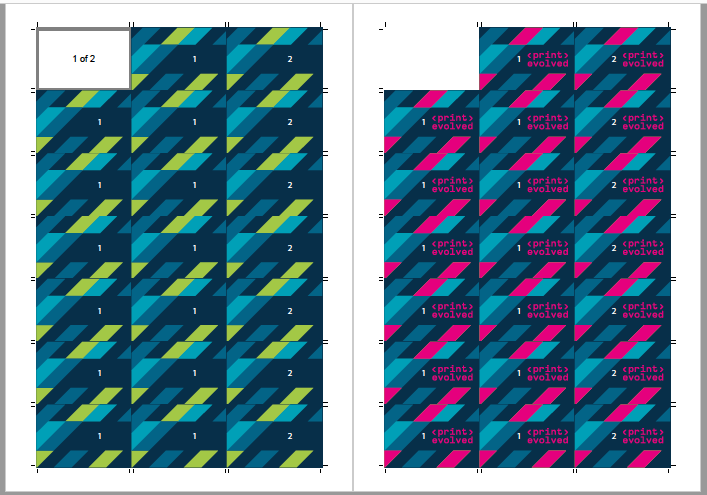
I’m having an issue with the attached imposition. The reverse slots are not populating as expected.

Both pdfToolbox log, and also running the script in VSCode, they show the left position of the reverse slot should be 205.5. But I’m getting both front and reverse at position 29.5 in the final imposition pdf.

I’m populating one page at a time. So, page 0, slot 0 (frontSlotID) at 29.5 on frontSheetID, then page 1, slot 0 (reverseSlotID) at 205.5 on reverseSheetID (to mirror when the sheet is printed double sided).

I need to fill the page top-down per column. So, starting on left column on front, and right column on reverse.

But the result I’m getting is both slots (front and reverse) at position 29.5 for pages 0 and 1

You can download the test PDF from here

Am I missing something silly? Or is pdfToolbox actually placing the pages the wrong way?

Thanks for your help,
Adrian

Hi Adrian,

For some reason your runlist uses for all sheets the same (first) sheet definition as can be seen in the impose.json:

...

impose.json (546.0 KB)


   "sheets" : [
      {
         "placements" : [...],
         "sheet_def" : 0
      },
      {
         "placements" : [...],
         "sheet_def" : 0
      },
...

I think the problem is that you only have one sheet definition with id 0 from which you create a sheet for every front and reverse sheet with there respective ids to which you than add the slots.

The misconception here is that slots must always be added to sheet definitions and not to sheets!

You should try to add a sheet definition for every sheet, add slots and create a sheet from this and place your pages.

s.a. documentation for the convenience functions:

Best regards,

Ulrich

Hi, Ulrich

Sorry, but now I’m even more confused. I thought my script already does that, especially since it’s not possible to add page to a sheet definition because that returns a javascript exception error.

Here is a breakdown of imposition section of my script:

// Create imposition
const imposition = new Impose({ unit: "mm" });

// Create a new sheet definition
const sheetID = imposition.addSheetDef(sheetWidth, sheetHeight, "mm");
...


const numSheets = Math.ceil(lastPage / group); // Total number of sheets for imposition to iterate
...


// ===== IMPOSITION =====
let pageIndex = 0;
let groupPageCount = Math.ceil(lastPage / numOfSlots);
if (sides == 2 && groupPageCount % 2 !== 0)
        groupPageCount++;

do {
	// Add front and reverse sheets (if DS) for each iteration
	const frontSheetID = imposition.addSheet( sheetID );
	const reverseSheetID = (sides == 2) ? imposition.addSheet(sheetID) : "";
	let groupPage = pageIndex;
	
    // Iterate through all the columns and rows until it fills one sheet (front and reverse if DS)
	for (let col = 0; col < numCols; col++) {
		for (let row = 0; row < numRows; row++) {
			...
			
			// ===== FRONT SHEET =====
			...
			
			// Create front sheet slot
			const frontSlotID = imposition.addSlot(frontSheetID, {
			     ...
			} );
			
			// Assign odd pages to the front sheet
			imposition.addPage(frontSheetID, frontSlotID, groupPage);
			
			
			// ===== REVERSE SHEET =====
			if (sides == 2) {
				...

				// Create reverse sheet slot
				const reverseSlotID = imposition.addSlot(reverseSheetID, {
					...
				} );
				
				// Assign next page to the reverse sheet in a mirrored position
				imposition.addPage(reverseSheetID, reverseSlotID, groupPage + 1);
				
			}
			
			groupPage += groupPageCount;
		}
	}
	groupPage += groupPageCount;
	pageIndex += sides == 2 ? 2 : 1;
	groupPage = pageIndex;
	currentSheet++;
	
} while (currentSheet <= numSheets);

What makes this all even more confusing to me is that I have another script that is nearly identical that it works fine (below). The only difference between these scripts is that one fills the page top down per column and the other fills the page left-to-right per row (they are a copy and paste of each other).

Dynamic Cut and Stack (left to right per row) DEBUG.kfpx (25.3 KB)

Result of the “left to right per row” script (correct result).

However, that being said, after reviewing and comparing the two scripts I noticed one other difference which I thought it was a mistake.

When adding a page to the reverse of the sheet:
-The script that works is placing the slot on what it seems to be the front sheet instead of the reverse:
const reverseSlotID = imposition.addSlot(frontSheetID, {…});

-I thought this was a mistake and changed the new script (“top down per column”) to what you see above:
const reverseSlotID = imposition.addSlot(reverseSheetID, {…});

If I change the “top down per column” script to add the reverseSlotID to the frontSheetID, it works correctly:

Is my logic for a double sided document off?

  1. Create front sheet
  2. Create reverse sheet
  3. Add slot to front sheet
  4. Add page to front slot
  5. Add slot to reverse sheet
  6. Add page to reverse slot

Hi Adrian,

As said: slots are to be added to sheet definitions and not to sheets. Unfortunately error handling is not perfect in the current release and adding slots to non existing sheet definitions silently creates sheet definitions that were never created. This will be fixed in the next release.

Example:

const imposition = new Impose({ unit: "mm" });
const sheetID = imposition.addSheetDef(sheetWidth, sheetHeight, "mm");

//create a sheet from sheet definition sheetID
const frontSheetID = imposition.addSheet( sheetID );

//create a sheet from sheet definition sheetID
const reverseSheetID = imposition.addSheet(sheetID)

//creates a slot on sheet definition sheetID because sheetID == frontSheetID
const frontSlotID = imposition.addSlot(frontSheetID, {})

//This is actually an error because reverseSheetID == 1 and no sheet definition with id 1 exists. This should throw an exception
const reverseSlotID = imposition.addSlot(reverseSheetID, {})

One solution could be to create sheet definitions on the fly, one for the front and one for reverse:

// Create imposition
const imposition = new Impose({ unit: "mm" });

//const sheetID = imposition.addSheetDef(sheetWidth, sheetHeight, "mm");

...

const numSheets = Math.ceil(lastPage / group); // Total number of sheets for imposition to iterate
...


// ===== IMPOSITION =====
let pageIndex = 0;
let groupPageCount = Math.ceil(lastPage / numOfSlots);
if (sides == 2 && groupPageCount % 2 !== 0)
        groupPageCount++;

do {
	// Add front and reverse sheets (if DS) for each iteration
	// Add front and reverse sheets (if DS)
	const frontSheetDefID = imposition.addSheetDef(sheetWidth, sheetHeight, "mm");
	const frontSheetID = imposition.addSheet( frontSheetDefID );
	let reverseSheetID = -1;
	if( sides == 2)
	{
		const reversSheetDefID = imposition.addSheetDef(sheetWidth, sheetHeight, "mm");
		reverseSheetID = imposition.addSheet(reversSheetDefID);
	}
	let groupPage = pageIndex;
	
    // Iterate through all the columns and rows until it fills one sheet (front and reverse if DS)
	for (let col = 0; col < numCols; col++) {
		for (let row = 0; row < numRows; row++) {
			...
			
			// ===== FRONT SHEET =====
			...
			
			// Create front sheet slot
			const frontSlotID = imposition.addSlot(frontSheetDefID, {
			     ...
			} );
			
			// Assign odd pages to the front sheet
			imposition.addPage(frontSheetID, frontSlotID, groupPage);
			
			
			// ===== REVERSE SHEET =====
			if (sides == 2) {
				...

				// Create reverse sheet slot
				const reverseSlotID = imposition.addSlot(reverseSheetDefID, {
					...
				} );
				
				// Assign next page to the reverse sheet in a mirrored position
				imposition.addPage(reverseSheetID, reverseSlotID, groupPage + 1);
				
			}
			
			groupPage += groupPageCount;
		}
	}
	groupPage += groupPageCount;
	pageIndex += sides == 2 ? 2 : 1;
	groupPage = pageIndex;
	currentSheet++;
	
} while (currentSheet <= numSheets);

If all front and revers sheet definitions are equal you could also add just two global sheet definitions and use them in you loop.

1 Like

Thank you very much for your time Ulrich.

That makes sense to me now.